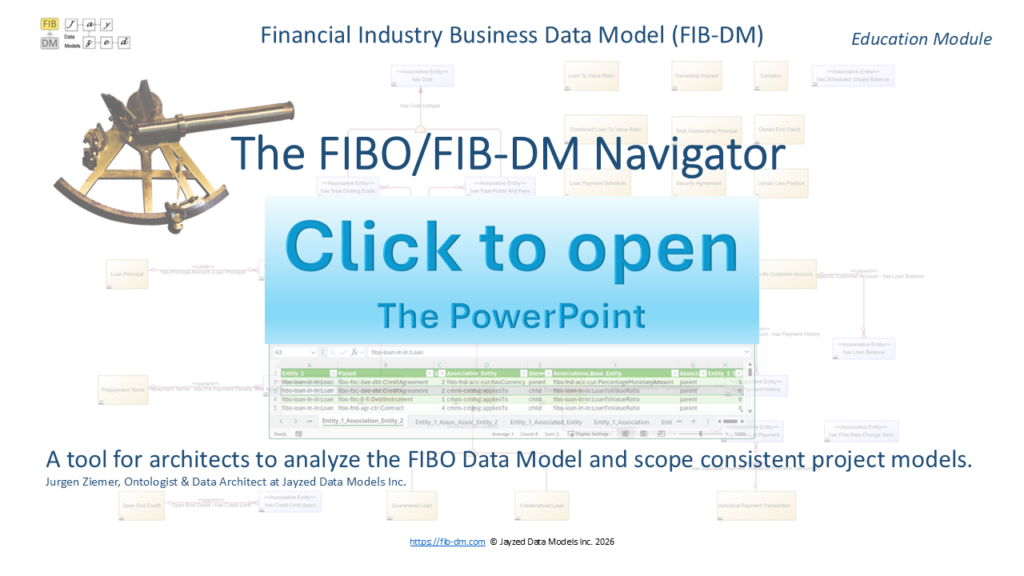
FIBO/FIB-DM Navigator is a powerful tool for data architects, business users, and ontologists to analyse hierarchies and connections in the model. It accelerates the scoping of project models from the industry standard.
In data modeler lingo, the term “island” refers to an entity with no relationships to the rest of the model. While the FIBO and hence FIB-DM are integrated and consistent designs (without islands), finding paths between two entities via relationships and Associative Entities remains a major challenge, even for FIBO experts.
This class explains the 23 MS-Excel worksheets populated with metadata sets for Entities, subtype hierarchies, and Associative Entities. Attendees learn how to search for direct and indirect (with an intermediate entity) associations and interpret and filter the results.
I recommend watching the Navigator video first, because it has more text and a live demo. Then study the PowerPoint presentation in MS Office online, and download a PDF version.
Text of the presentation
Financial Industry Business Data Model (FIB-DM) Education Module
The FIBO/FIB-DM Navigator
A tool for architects to analyze the FIBO Data Model and scope consistent project models. Jurgen Ziemer, Ontologist & Data Architect at Jayzed Data Models Inc.
Financial Industry Business Data Model
An MS-Excel FIB-DM analysis workbook.
The Navigator provides 23 worksheets that accelerate model research on hierarchies and associations.
A white book without a special GUI.
You use standard MS Excel functionality to search, filter, and sort the metadata.
The tool is pre-populated with the latest FIB-DM release (Q4/2025 or later).
Part of the FIB-DM resources (bonus materials) for commercial licensees.
Data Architects find critical information ad hoc, rather than manually traversing object relations in the data modeling tool.
Business Users or Subject Matter Experts can research FIB-DM content without knowledge or a license of PowerDesigner or ERWin.
Ontologists have the same need to find joins when populating a FIBO-derived operational ontology or writing SPARQL queries. FIB-DM Base and Associative Entities lineage provides the URI of the FIBO class or object property that they derived from. Subtypes derived from FIBO/OMG Commons rdfs:subtypeOf properties.
Data Architect Business, SME 2
Islands
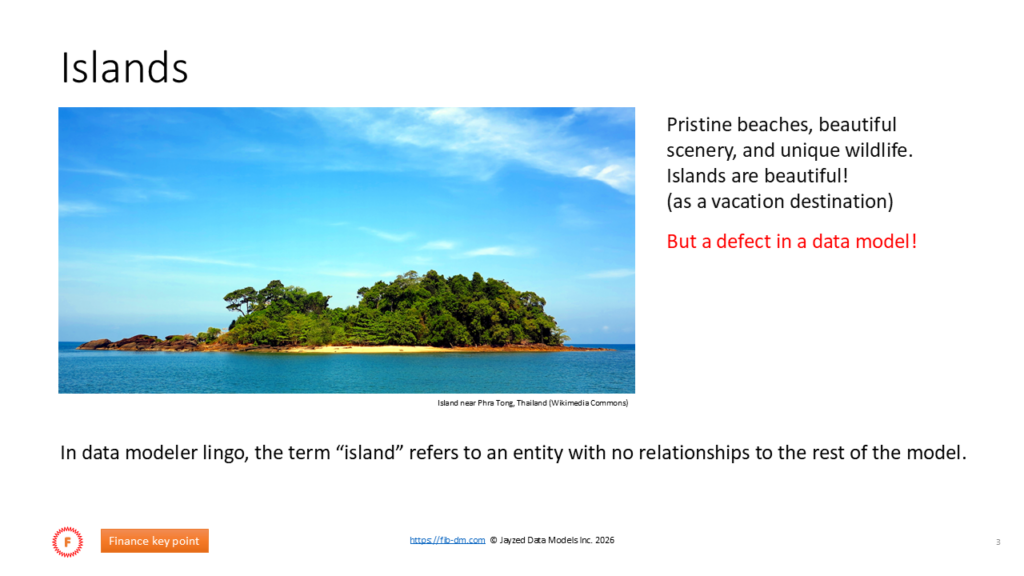
Pristine beaches, beautiful scenery, and unique wildlife. Islands are beautiful!
(as a vacation destination)
But a defect in a data model!
Island near Phra Tong, Thailand (Wikimedia Commons)
In data modeler lingo, the term “island” refers to an entity with no relationships to the rest of the model.
F Finance key point 3
FIB-DM Package diagrams, Loans
The Loans package diagram includes isolated entities, such as LTV, Principal, and Security Arrangement.
We also observe a cluster of entities modeling the account and payments with no Association to the Loan.
This is not a model defect. The FIB-DM package diagram depicts only the entities defined in the source ontology.
The Loans ontology imports other FIBO modules that define the Associative entities.
As we will see, supertypes of Loan, Account, and Payment have connecting Associative entities.
F Finance key point 4
Navigation = the Path for query join, or population.
How do we “navigate” from the Loan to its LTV or Principal?
Application developers need to query.
ETL architects must populate the FIB-DM database.
<> has Cost
has Cost subtype
Total Outstanding Principal
Combined LoanTo Value Ratio
There are no islands in the FIBO, and hence none in FIB-DM.
All FIB-DM entities have connecting relationships.
<>
has TotalClosing Costs
has TotalPoints And Fees
Loan To Value Ratio
The FIB-DM modeler is responsible for scoping a consistent subset model (without islands).
<>
Loan- has TotalClosing Costs
<>
Loan- has TotalPoints And Fees
In a 3000-entity data model, this is a challenge, even for FIBO/FIB-DM experts.
Loan
<> Loan- is Serviced By
is Serviced By
Data Architect 5
Loans General package diagram
So, how do we find the connection from the Loan to its Payment Schedule?
This class shows the challenges of researching related entities in the data modeling tool.
?
It presents the Navigator tool as a fast, convenient solution.
Data Architect 6
Supertype Associations
In the “Scoping our first data model” class, we added the supertypes of our scoped entities all the way to the ultimate FIB-DM concept entity.
Then we scoped Associative Entities to match the business requirements in the Concept Map.
Data Architect 7
A consistent FIB-DM submodel
Conceptual Data Model Model: Financial IndustryBusiness Data Model (FIB-DM) Package: Call Report
Diagram: Call Report scope
Author: JurgenZiemer, © Jayzed Data Models Inc. Date: 2025-11-14 Version: October, 2025 (FIBO 2025/Q3) https://fib-dm.com
<> identifies (cmns)
Role
Role subtype
Legal EntityIdentifier – identifies (cmns)
Financial Service Provider Identifier – identifies (cmns)
Designation
Designationsubtype
<>
identifies (cmns) -Legal Person(cmns)
Associative Entities connect all required entities, either directly or via their supertypes.
Agent Role
identifies (cmns) -Financial Service Provider
Agent Role subtype
identifies (cmns) -Financial Institution
Service Provider (cmns)
Service Provider (cmns) subtype
Financial Service Provider RegistrationAuthority(cmns)
PartyRole Identifier
PartyRole Identifier subtype
(D)
RegistrationAuthority(cmns) – registers (cmns) Financial Service Provider Identifier
Identifier (cmns)
Identifier (cmns) subtype
Contextual Identifier
Contextual Identifier subtype No islands, no archipelagos.
Financial Service Provider subtype <> registers (cmns)
registers (cmns) -Registered Identifier
Registered Identifier
Registered Identifier subtype
Collection (cmns)
Collection(cmns) subtype
Agent
Agent subtype
Reference
Reference subtype
Financial Institution
Financial Institutionsubtype
Financial Institution- manages (cmns)
registers (cmns) -Legal EntityIdentifier
<> RegistrationAuthority(cmns) – manages (cmns)
Legal EntityIdentifier
<> Structured Collection Registered Identifier – is Registered In(cmns)
Structured Collectionsubtype
Party
Partysubtype
Index
Indexsubtype
<> DepositoryInstitution registers (cmns) -FDIC Certificate Number
FDIC Certificate Number
FDIC Certificate Number – is Registered In(cmns)
is Registered In(cmns)
Legal Person(cmns)
is Registered In(cmns) -Registry(cmns)
Address
Address subtype
<> manages (cmns)
manages (cmns) -Legal Entity(cmns)
manages (cmns) -Registry(cmns)
Legal Person(cmns) subtype Registry(cmns)
Legal Entity(cmns) <>
Legal Entity(cmns) – has Legal Address
Legal Entity(cmns) subtype
Physical Address (D) <>
Physical Address – has Country(cmns) Region
<> Physical Address subtype
has Legal Address
has Country(cmns) Regionsubtype
Corporation
has Legal Address -t>ional Street Address Conventional Street Address
Corporationsubtype
(D) <>
Stock Corporation
Stock Corporation- has Issued Capital
has Issued Capital
Scalar Quantity Value
Scalar QuantityValue subtype
Geographic Region(cmns)
Geographic Region(cmns) subtype
has Issued Capital -MonetaryAmount
MonetaryAmount Geopolitical Entity(cmns)
MonetaryAmount subtype Geopolitical Entity(cmns) subtype <>
has Country(cmns) -Country(cmns)
Balance Country(cmns)
But how do we find the correct FIB-DM Associative Entity?
Data Architect 8
Navigating in the data modeling tool
In PowerDesigner, the Loan Entity Properties Relationships tab lists all connected Associative Entities.
The Code shows the four relationships depicted in our diagram, as well as additional relationships from other packages: FIBO Foundation (fnd), Finance Business & Commerce, and OMG Commons.
Alas, none of the Associative entities suggest a connection to a payment schedule.
Maybe “releates to” is a candidate?
We have to navigate to Entity2 and examine its relationships.
Data Architect 9
Relationships of the Associative Entity
The “relates to” associative entity connects only two Base Entities: The Loan Specific Customer Account and the Loan itself.
Take note: an important Association that relates accounts to loans and their subtypes, such as student, commercial, and mortgages.
However, we were looking for the Payment Schedule.
We must repeat the exercise for the Entity Supertyes.
Data Architect 10
Supertypes of the Base Entity
In PowerDesigner, the Loan Entity Parents tab lists all supertypes of the entity.
We see that the Loan is both a Debt Instrument and a Credit Agreement Repaid Periodically.
We investigate Associative Entities related to the two supertypes.
Data Architect 11
Associations of the supertype
The Credit Agreement has relationships with many Associate Entities.
The cms-cxtdsg:appliesTo relationship to the likenamed Associative entity appears to be a candidate.
Excursus: The code, left of the colon, derived from the ontology prefix.
In this case, OMG Commons (cms), Contextual Designators (cxtdsg) module.
We explore the Associative entity.
Data Architect 12
Entities related to the Association
The OMG Commons “apples To” Associative Entities relates to numerous Base Entities. The foundational Object Property is quite generic and applied throughout the FIBO Data Model.
We find a direct match – a relationship – to the
Loan Payment Schedule.
Data Architect 13
From Loan Payment Schedule to Loan
The Loan Payment Schedule “applies To” a Credit Agreement, which is a supertype of the Loan.
LoanPaymentSchedule
<> LoanPaymentSchedule – applies To
<>
applies To
applies To -CreditAgreement
CreditAgreement
CreditAgreementsubtype
In the solution, we navigate via three entities.
Examining our Entities, their Associative Entities, and their related Entities was already quite time-consuming.
In practice, both Entities may be associated only through their supertypes. In other words, we may have to traverse down from a supertype entity to its subtypes searching for our target entity.
Sometimes, the connection involves two Associative Entities! For example, to find the homeowner on a Mortgage.
CreditAgreementRepaid Periodically
CreditAgreementRepaid Periodicallysubtype
Data Architect 14
PD Impact Analysis
PowerDesigner has an Impact Analysis that shows the Loan Relationships. So we can find the Loan Specific Customer Account.
We also see the Loan supertypes (parents).
However, the Impact Analysis does not show the relationships of the Credit Agreement.
Also, at 3000 impacted model objects, PowerDesigner has reached its limitations.
Data Architect 15
The challenge in summary
“Islands,” entities or clusters of entities without connections to the rest of the model, are a data model defect.
There are no islands in the FIBO, and hence none in FIB-DM. All FIB-DM entities have connecting relationships.
The way from one entity to another often traverses their supertypes. Sometimes, the route involves an intermediate base entity and two Associative entities.
Finding the route in the data modeling tool can be slow and cumbersome, even for FIBO Experts. FIBO/FIB-DM novices are overwhelmed by the size of the industry standard.
FIB-DM Data Architects need a fast and comprehensive tool to analyse Entity hierarchies and Associations.
Data Architect 16
Introducing the FIB-DM Navigator
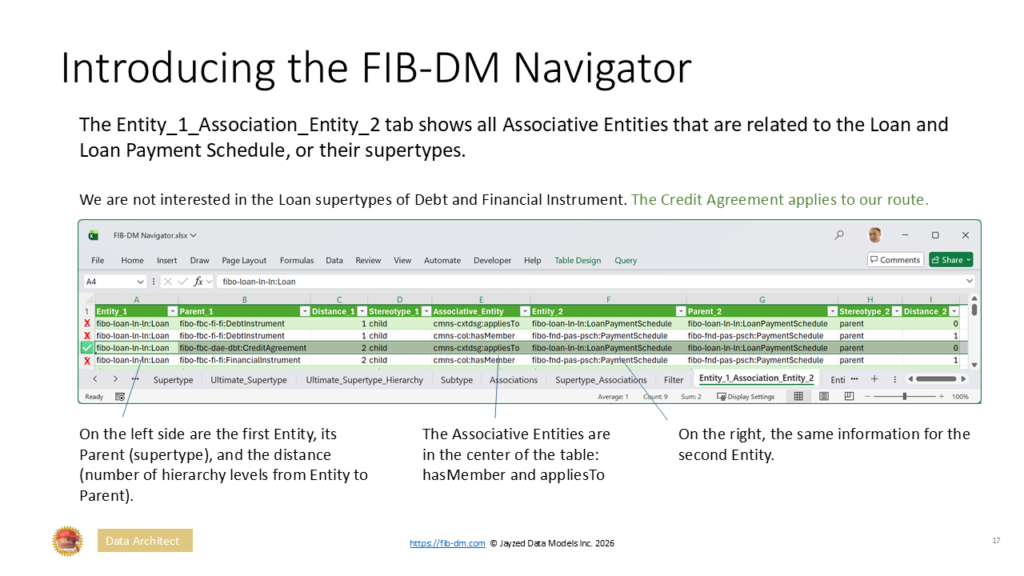
The Entity_1_Association_Entity_2 tab shows all Associative Entities that are related to the Loan and Loan Payment Schedule, or their supertypes.
We are not interested in the Loan supertypes of Debt and Financial Instrument. The Credit Agreement applies to our route.
x x
x
On the left side are the first Entity, its Parent (supertype), and the distance (number of hierarchy levels from Entity to Parent).
Data Architect
The Associative Entities are in the center of the table: hasMember and appliesTo
On the right, the same information for the second Entity.
17
Navigator source data
The Navigator comprises 23 worksheets and MS Power Queries.
Input data are 3 FIB-DM release reports defined in PowerDesigner and shipped with the quarterly releases. (FIBO Q4/2025 for this tutorial): The Entity Definitions, Relationships, and Inheritances (subtypes).
Analytics worksheets sort, filter, and merge the input data sheets. They are useful views for the Data Architect or Subject Matter Expert, as well as for gradually arriving at complex analytics, such as the Associations between two entities.
The following slides provide a detailed explanation of the worksheets.
Data Architect Business, SME 18
Entity Definitions
This sheet is a copy of the FIB-DM Release Entities Report. Users sort and filter to look up entity names and definitions. For MS Power Queries that populate analytics sheets, the report provides a list of all entities and their Stereotype to
differentiate Base from Associative Entities.
Data Architect Business, SME 19
Supertype
The worksheet flattens the recursive hierarchy of the data model subtype report.
Filtered for the Closed End Mortgage Loan, it shows all supertypes (Parent) of an entity. The Distance is the number of hierarchy levels from the Entity to the Parent.
The Architect can see all supertypes at a glance, rather than manually traversing the hierarchy in the modeling tool.
The Navigator joins this sheet in analytical queries to determine all Associations of a given entity.
Data Architect Business, SME 20
Ultimate Supertype
Ultimate supertypes are entities that are not a subtype of (have to inheritances from) other data model entities.
They derive from ontology classes that are only rfs:subType of The Thing.
FIBO imports the OMG Commons Ontology Library, and Commons Entities (code starting cmns-) are now the ultimate supertype for 90% of FIB-DM entities.
Note: Likenamed OMG Commons entities have replaced the FIBO Legal Entity and Legal Person, but they are still listed as ultimate supertypes.
However, the FIBO entities are deprecated and will be removed in future ontology and data model releases.
Data Architect Business, SME 21
Ultimate Supertype Hierarchy
The worksheet lists all subtypes of an ultimate supertype. The table is a join of Ultimate Supertype and subtypes.
The distance column shows the subtype’s level.
The screenshot shows the Situation hierarchy.
Direct suptypes (Distace 1) relevant for Loans are the Commitment and the Agreement.
Distance, level 2 shows the Guarantee and the Contract.
Data Architect Business, SME 22
Subtype
The worksheet list all subtypes of FIB-DM entities.
The screenshot example is filtered for the Loan entity.
This is a useful filter for the Architect or Subject Matter Expert to find specialization like Consumer, Commercial loans and mortgages.
Data Architect Business, SME 23
Associations
This table is central to finding the connections between two entities.
For each Base Entity, it lists all Associative entities connected by a relationship.
The worksheet is derived from the Data Model relationships report, with Base and Associative entities as Entity 1 and Entity 2.
The Stereotype indicates the directions of the relationship. For example, the Loan (parent) has a Guarantor.
The Configurable Ontology to Data model Transformation (CODT) derives the stereotype from the object property’s domain (parent) and range (child), as well as from class restrictions.
Data Architect Business, SME 24
Subtype Associations
The worksheet shows all Associations of an Entity, including its subtypes.
The FIB-DM Architect uses the report to expand the scope of her subset model.
The Loan example in the screenshot lists important Associations to pull into scope, such as Principal, Guarantor, Account, Borrower, Schedule, Collateral, and Contractual Elements.
Data Architect Business, SME 25
The worksheet shows all Associations of an Entity, including its supertypes.
This table is the key input for finding the path between two entities.
The Loan’s direct supertype (Parent, Distance 1) has Associations to the Lender, Borrower, and Payment Terms.
The Loan’s direct supertype (Parent, Distance 1), the Debt Instrument, has Associations to the Lender, Borrower, and Payment Terms.
The Credit Arrangement (two levels up the hierarchy) associates the Account, Currency, Collateral, and Maturity.
Data Architect Business, SME 26
Filter the path between two entities
First, we must specify the entities in the Filter tab. In the example screenshot, we are looking for connections between the Loan and its Loan to Value Ratio.
Q: Why can’t we have a worksheet Second, we Refresh All queries in the Data ribbon, Queries and Connections group. that shows connections among all
entities?
A: The self-join has too many rows.
The Queries and Connections tab shows the query status and the number of rows in the result sets.
Data Architect Business, SME 27
Selecting the right Association
The Entity_1_Association_Entity_2 tab shows 4 rows of Associate Entities and their relationships to Loan and LTV
The stereotypes are our first criterion. We are looking for Parent-Child relationships. Credit Agreement and LTV, in row 5, both Parent merely have a Currency, but that doesn’t navigate from the Loan to its LTV.
LTV applies to Loan supertypes Credit Arrangement and Debt Instrument.
Data Architect Business, SME 28
Adding the Associative Entity to the scope
The appliesTo associative entity provides the path not only to the LTV, but also to the Combined LTV, Payment Schedule, and the Customer Account
Conceptual Data Model Model: Financial Industry Business Data Model (Normative) Package: Loans
Diagram: Loans entities
LoanTo Value Ratio Ownership Interest Comaker
LoanTo Value Ratio – applies To
Combined LoanTo Value Ratio TotalOutstanding Principal Closed End Credit
Combined LoanTo Value Ratio – applies To
<> has TotalClosing Costs
LoanPayment Schedule SecurityAgreement Lender LienPosition
<> LoanPayment Schedule – applies To
applies To -LoanSpecific Customer Account
<> LoanPrincipal has PrincipalAmount -LoanPrincipal
has PrincipalAmount
Loan- has PrincipalAmount Loan
<> <>
is Serviced By is Serviced By-Servicer Servicer LoanSpecific Customer Account
Next, we scope the appropriate Loan supertype.
Data Architect Business, SME 29
Adding the related supertype to the scope The Entity Property Dependencies and the Navigator Supertypes indicate multiple inheritance (two rows with Distance 1).
At the bank, we scope the Credit Agreement and the Credit Agreement Repaid Periodically (An Investment Fund might scope the Debt Instrument).
Credit Agreement
Credit Agreement subtype
<>
applies To -Credit Agreement
LoanTo Value Ratio
Credit Agreement Repaid Periodically
Credit Agreement Repaid Periodicallysubtype
LoanPayment Schedule
Loan LoanSpecific Customer Account
Data Architect Business, SME 30
Loan to Principal – a two-off join
We set the Filter for Loan and Total Outstanding Principal, and Refresh All queries. Alas, there is no direct Association between the entities. So, we try the Entity_1_Assoc_Assoc_Entity_2 tab, which is a route with an intermediate entity between the entities.
For the two entities, the worksheet provides the same information as the previous direct path: Entity, Parent, Distance, Associative Entity, and Stereotype
In the worksheet center, we see the Intermediate Entity and the stereotypes of the Relationships to Entity 1 and 2.
Data Architect Business, SME 31
Filtering candidate intermediate entities
The initial result set has 130 records! But you can use judgment and experience to narrow down the candidates.
We exclude FIBO Indicators and Derivative packages, which do not pertain to Loans
We deselect Intermediate Entities that obviously have no relevance: Security Price, Basket, Trade, Owners Equity, Dated Structured Collection, Product, Environmental Program, Debt Pool Statistics.
We keep Intermediate Entities that look reasonable: Debt Terms, Interest, Principal Repayment Terms, Loan to Value Ratio.
Data Architect Business, SME 32
Reviewing the remaining candidates
We can disregard the LTV, rows 107-118, and the Intermediate Entity because Associative Entity 2 merely declares that the Principal is an argument of the LTV. We want to tie the Principal to the Loan, regardless of whether we calculate LTV.
Principal Repayment Terms or Debt Terms (in grey) govern the Payment of Principal (Associative_Entity_2), which is a strong Association.
Debt Instrument and Credit Agreement (Parent 1) are close supertypes of the Loan. Repayment Terms is actually a subtype of Contractual Element.
Let’s look at the diagram that includes both in the FIB-DM Loans scope.
Data Architect Business, SME 33
Two valid ways to navigate from Loan to Principal
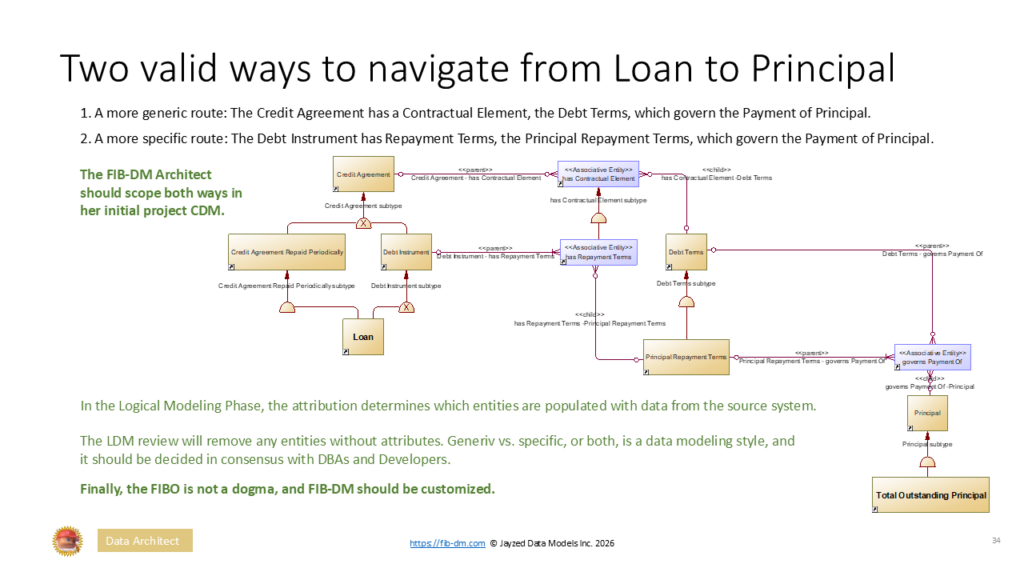
1. A more generic route: The Credit Agreement has a Contractual Element, the Debt Terms, which govern the Payment of Principal.
2. A more specific route: The Debt Instrument has Repayment Terms, the Principal Repayment Terms, which govern the Payment of Principal.
The FIB-DM Architect should scope both ways in her initial project CDM.
Credit Agreement – has Contractual Element
<> has Contractual Element
has Contractual Element subtype
has Contractual Element -Debt Terms
Credit Agreement Repaid Periodically Debt Instrument
Debt Instrument – has Repayment Terms
has Repayment Terms
Debt Terms Debt Terms – governs Payment Of
Credit Agreement Repaid Periodicallysubtype Debt Instrument subtype Debt Terms subtype
has Repayment Terms -Principal Repayment Terms
Principal Repayment Terms
Principal Repayment Terms – governs Payment Of
governs Payment Of
In the Logical Modeling Phase, the attribution determines which entities are populated with data from the source system.
The LDM review will remove any entities without attributes. Generiv vs. specific, or both, is a data modeling style, and it should be decided in consensus with DBAs and Developers.
Finally, the FIBO is not a dogma, and FIB-DM should be customized.
governs Payment Of -Principal
Principal
Principal subtype
Data Architect Business, SME 34
All Entity1 Associations
Similar to the Entity_1_Association_Entity_2 table, this worksheet example shows all associations of the Closed-End Mortgage. Architects and SME use the worksheet to research other entities that should be included in the scope. We filter the large number of records:
Any “Date” related to the loan 1. Exclude Derivatives, fibo-der 2. Child Associations
Written Contracts have a Date of Issuance, an Effective and Execution Date, a Date of Maturity, and Real Estate Loans have a Funding Date.
Data Architect Business, SME 35
FIBO/FOB-DM 15+5 concepts
The workbook shows concepts with their names, mnemonics, and Ultimate Supertype entities.
Study the Semantics for Finance Users lesson and the House of Finance article for details.
https://fib-dm.com/house-of-finance-15-business-concepts/ https://fib-dm.com/semantics-for-finance-users/
Data Architect Business, SME 36
Concept Hierarchy and Associations
A join of the Ultimate Supertype hierarchy and the 15 concepts table.
A join of the Subtype Associations and the concepts table.
The tabs are useful for enterprise architects and other users to study how a concept fits into the model.
Data Architect Business, SME 37
MS PowerQuery dependencies
Supertypes filtered by Entity 1
Associations filtered by Entity 1 Supertypes
The table is a join of Entity 1 Associated Entities and Entity 2 Supertypes
Data Architect 38
Navigation for ontologists
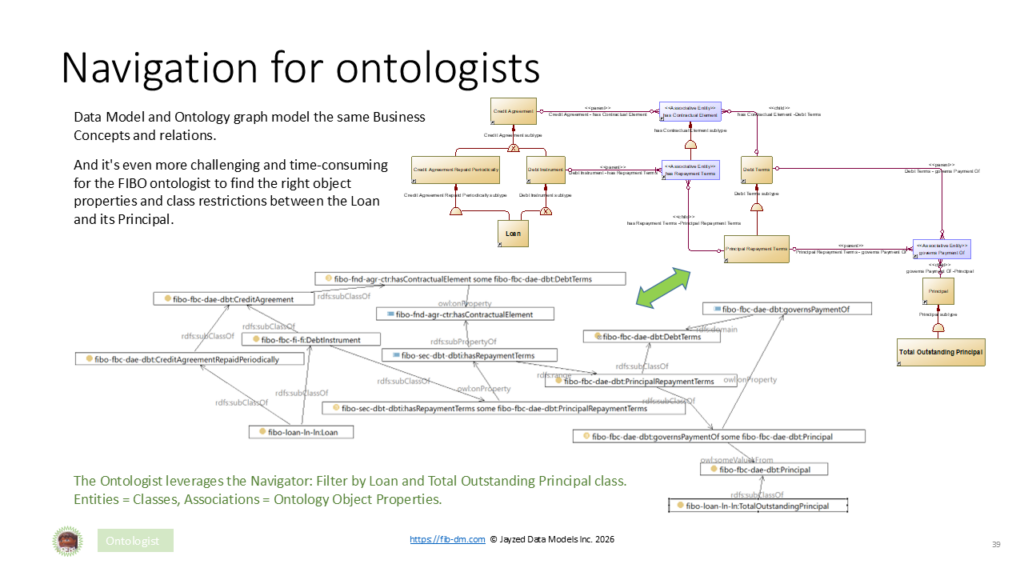
Data Model and Ontology graph model the same Business Concepts and relations.
Credit Agreement Credit Agreement – has Contractual Element has Contractual Element
And it’s even more challenging and time-consuming for the FIBO ontologist to find the right object properties and class restrictions between the Loan and its Principal.
Debt Instrument Debt Instrument – has Repayment Terms has Repayment Terms Debt Terms
Debt Instrument subtype Debt Terms subtype
Debt Terms – governs Payment Of
The Ontologist leverages the Navigator: Filter by Loan and Total Outstanding Principal class. Entities = Classes, Associations = Ontology Object Properties.
Ontologist 39
Summary and further study.
We discussed that Islands, Entities without relations to the rest of the model, are a defect. There are no islands in the FIBO or FIB-DM. And you must not scope entities without Association to the rest of your project model.
Finding the path between two scoped Entities can be time-consuming in the data modeling tool.
The FIBO/FIB-DM Navigator has MS Excel sheets populated with FIB-DM metadata.
We sort and filter to quickly find Associative, even Intermediate Entities to include in the scope.
Semantics for Data Architects, Finance Users and the 15 fundamental Concepts, and Scoping a FIB-DM model are prerequisites for this advanced class.
Data Architects and Ontologists should also study the Hierarchy and Object Property = Association articles. The Configurable Ontology to Data model Transformation (CODT) derived the FIBO Data Model.
Advanced Financial Institutions use CODT to keep their customized ontologies and data models in sync. https://fib-dm.com/data-model-resources/
Data Architect 40